Online Physiotherapy Appointment in Canada: How to Prepare

If “online physiotherapy appointment Canada” is what brought you here, a clear account of your symptoms and training can help make the session focused and practical. Video can’t replace hands-on assessment, but it can give your physiotherapist a useful view of how you move.
It’s understandable to wonder what to share or whether your movement will come across on screen. You don’t need a perfect setup or a polished explanation. A few details about when the concern started, which movements affect it, and what you want to get back to can give the appointment a strong starting point. With a stable camera and enough room, you may also be able to demonstrate a relevant movement safely.
This guide covers the information, space, and training context to prepare. You’ll learn what to note, how to position your device, and how to discuss practical next steps. PhysioParth’s virtual physiotherapy is tailored to strength athletes, powerlifters, and active individuals, so your training goals belong in the conversation.
Key Takeaways
- Before your online physiotherapy appointment Canada-wide, note when the concern began, what changed, and which movements affect it.
- Include relevant training or workload changes so your physiotherapist can understand your routine and goals.
- Video can help your physiotherapist observe movement and technique, but it doesn’t provide the same information as a hands-on assessment.
- Test your audio, secure your device at a useful angle, and clear enough space to move safely on camera.
- Use your notes and movement examples to guide a focused conversation about personalized analysis and rehabilitation next steps.
Start your online physiotherapy appointment in Canada with one clear goal
An online physiotherapy appointment is a video session where you discuss a concern, explore relevant movement, and work through possible next steps with a physiotherapist. You don’t need to arrive with a diagnosis or a perfect explanation. Start with what you notice and what you want to do more comfortably.
Physiotherapy can involve assessment, movement advice, and exercise-based care. The Physical therapy, also known as physiotherapy, overview offers general background on its scope and methods. For your appointment, focus on the activity that feels limited rather than deciding what caused the symptoms before the conversation begins.
Choose the one training problem you most want to address
Pick the lift, movement, or daily task that best captures your concern. Maybe your shoulder feels uncomfortable during an overhead press, or you hesitate when setting up for a deadlift. Describe when you notice the issue and what you’d like to change. “I want to train with more confidence” is a useful goal; “my shoulder pain is caused by poor mobility” is a diagnosis you don’t need to make.
If several things are bothering you, start with the one that most affects your training or daily routine right now. You can mention other concerns later. A specific starting point gives the conversation direction without assuming the cause.
Decide what a useful first appointment would help you understand
Think of one or two questions you’d like to explore. You might want to understand which movements are relevant to your symptoms, whether a training adjustment could help, or what a path toward rehabilitation might involve. Keep the questions open. Your physiotherapist can refine the focus as they learn more about your symptoms, training, and goals.
- Which movements should I pay attention to during training?
- What changes might help me keep moving while I work through this concern?
- What could the next steps in rehabilitation look like?
A first virtual session can help clarify the concern and guide the discussion, but it can’t promise a diagnosis or a particular outcome on its own. A useful result is a clearer picture of what to assess and which questions or actions make sense next.
A focused goal helps shape the movement assessment and keeps the discussion centred on the training or daily activity you want to improve. Write that goal in one sentence before your appointment. For example: “I want to understand why my knee feels uncomfortable when I squat and what steps could help me train with more confidence.” This gives you a clear opening while leaving room for the assessment to point in a different direction.
Build a concise injury and training brief before your online physio session
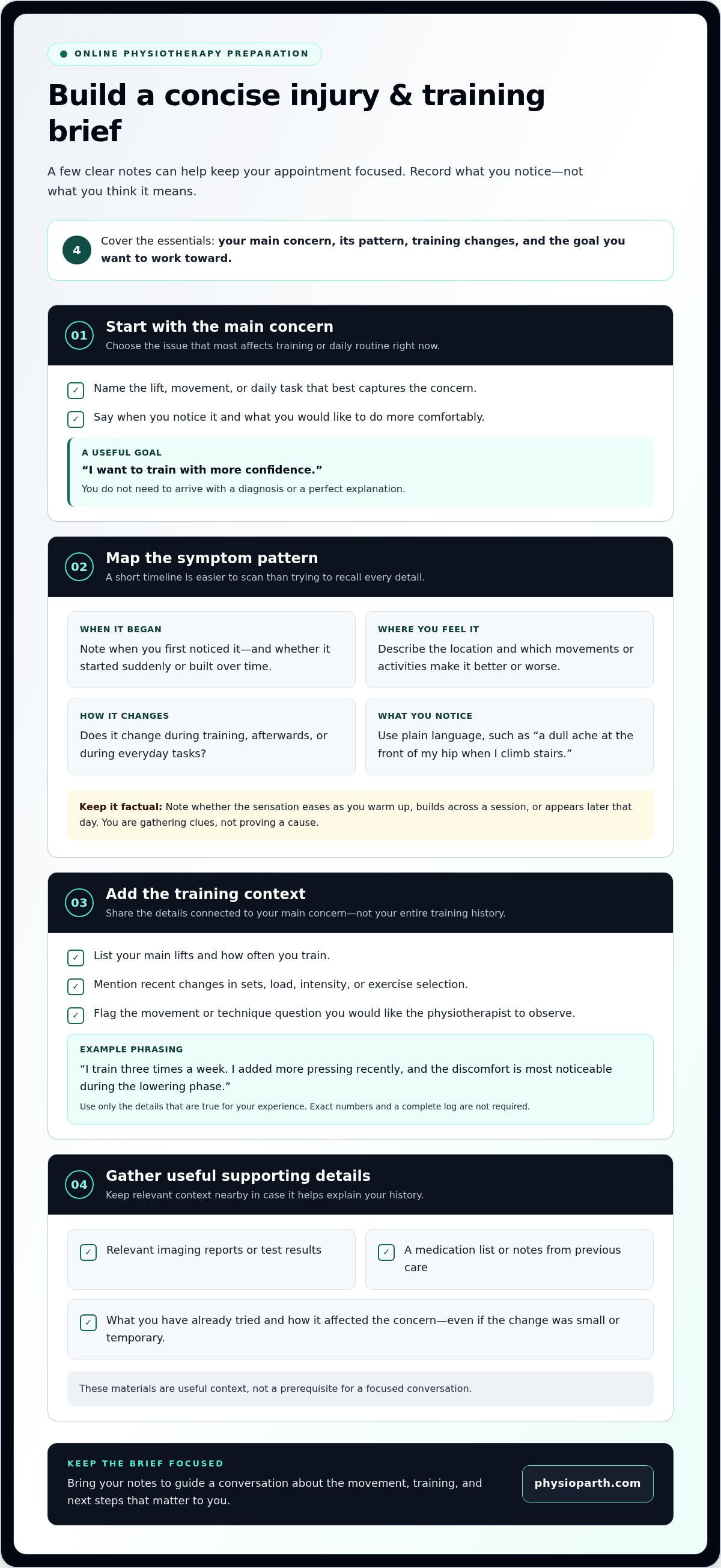
A short timeline is more useful than trying to recall every detail during the call. Before your online physiotherapy appointment Canada-wide, note when the concern first appeared, what changed around that time, and how it behaves now. A shift in training volume, a new exercise, a demanding work week, or a period away from training may add helpful context. You’re gathering clues, not proving a cause.
Keep your notes easy to scan. A few clear phrases can help you describe the pattern without turning the appointment into a long recap:
- When you first noticed the concern, and whether it began suddenly or built over time.
- Where you feel it and which movements or activities make it better or worse.
- How it changes during training, afterward, or during everyday tasks.
- What has shifted in your routine, and what you’d like to understand or do next.
A useful appointment brief covers onset, triggers, training changes, and the goal you want to work toward.
Track symptoms in plain language
Describe what you feel rather than trying to name an injury. “A dull ache at the front of my hip when I climb stairs” gives a clearer starting point than guessing at a diagnosis. Note whether the sensation eases as you warm up, builds across a session, appears later that day, or shows up during everyday tasks. Record what you notice, not what you think it means.
Bring the training context that changes the conversation
Share training details that connect to your main concern. List your main lifts, how often you train, and any recent change in sets, load, intensity, or exercise selection. Flag the specific movement or technique question you’d like the physiotherapist to observe. This context supports personalized analysis without burying the key issue under your full training history.
For example, you could write: “I train three times a week. I added more pressing recently, and the discomfort is most noticeable during the lowering phase.” Keep the wording true to your experience. You don’t need a complete log or exact numbers if you don’t have them. The aim is to make the pattern easier to discuss and explore.
If you have relevant imaging reports, test results, a medication list, or notes from previous care, keep them nearby in case they help explain your history. They’re useful context, not a prerequisite for a focused conversation. Mention what you’ve already tried and how it affected the concern, even if the change was small or temporary.
Bring the brief into your session to keep the discussion focused on the movement and training questions that matter to you. Learn more about virtual physiotherapy with PhysioParth.
Can online physiotherapy assess movement without hands-on treatment?
Yes. Video can help a physiotherapist observe how you move and how symptoms respond. It isn’t the same as hands-on care: a screen can show movement, but it can’t provide direct physical contact or every type of physical test. A useful assessment starts with the question you want to explore and whether it can be examined safely through guided movement.
During an online physiotherapy appointment Canada-wide, the physiotherapist can adapt the assessment to your concern, available space, and what the camera shows. You may be asked to try a simple movement, describe what you feel, or adjust your position so a specific part of the movement is easier to see. Speak up if an instruction feels uncomfortable or unclear.
What a video session can help the physiotherapist observe
Guided movement can offer useful clues about range, control, confidence, and symptom response. If it suits your concern, a bodyweight squat or hip hinge may help show how you move through a familiar pattern. For a lift-specific question, technique may be relevant too. The physiotherapist considers what’s visible alongside your description, rather than treating one movement as a complete answer.
A clear view and useful context make those observations easier to interpret. Mention which part of a lift brings on symptoms, and demonstrate the movement only if it feels safe. The physiotherapist may change the task or ask you to repeat part of it to explore what happens. You don’t need to perform a heavy or maximum-effort lift for the camera.
Where remote assessment has practical limits
Video can’t provide hands-on testing or direct contact with a joint or soft tissue. Some findings may require a physical examination that a video session can’t reproduce. If the camera angle, space, or movement makes an observation difficult, the physiotherapist can adapt the assessment, ask different questions, or adjust the next steps to fit what can be assessed remotely.
That limit doesn’t make video observation meaningless. The physiotherapist can consider visible movement, your account of symptoms, and how those symptoms change during a guided task. They’ll interpret those details together while recognizing what the session cannot establish. If the view doesn’t answer the question well enough, the assessment can shift rather than forcing a conclusion from limited information.
Remote assessment is useful when the movement or training question can be explored safely by video, with the limits of that view kept in mind. Don’t push through a movement just to demonstrate it. If symptoms are urgent or worsening rapidly, seek appropriate urgent medical attention instead of waiting for a routine virtual appointment.
Set up your camera and training space for a useful online physio appointment
Keep the setup simple. Your device needs to capture the movement being discussed, and your space needs to let you move without obstacles. You don’t need a home gym or a complicated camera rig. A stable phone or computer, clear floor space, and a quick sound check can be enough to get started.
Set up in this order:
- Test your audio and video. Open the meeting platform, check that your microphone and camera work, and make sure your internet connection is steady enough for a conversation.
- Secure your device. Place it on a stable surface, such as a table or stand. Don’t try to hold it while demonstrating a movement.
- Clear the camera view. Move clutter out of the way and check that the body position needed for the movement will stay in frame.
- Check the lighting and space. Make sure you’re easy to see, then leave enough room to move comfortably without bumping into furniture or equipment.
Position your device so the relevant movement is visible
Place the camera far enough away to capture the movement you plan to discuss, rather than just your face or upper body. A secure shelf or counter can work if it keeps the device steady and gives a useful angle. Before the call, step into frame and check that the lighting lets your position and movement show clearly.
Keep the area uncluttered. You should have room to move safely, but you don’t need to clear an entire room. Set out only equipment connected to the concern, such as a chair or the training implement you want to discuss. Leave heavier or awkward equipment aside unless it’s relevant and you can use it safely.
Make the call easy to follow
Choose a private spot where you can speak freely and move without interruptions. Keep your phone or computer plugged in if needed, and place water nearby so you don’t have to leave the frame mid-conversation. If the connection or sound falters during the test, adjust your position or reconnect before the appointment begins.
Keep the setup practical. You’re not filming a training session, and you don’t need to record yourself while moving. The physiotherapist can guide what to show during the appointment, and you can reposition the device if a different view would help.
With your space ready, you can focus on the conversation rather than troubleshooting your camera. Learn about virtual physiotherapy with PhysioParth.
Turn your preparation into a focused PhysioParth appointment
Your notes and camera setup give the conversation a practical starting point. Bring your main concern, a short account of how it behaves, and the training context that matters. That helps connect what you’re experiencing with the movements and goals you want to discuss, instead of spending the session trying to remember details.
PhysioParth’s virtual physiotherapy is tailored to strength athletes, powerlifters, and active individuals. The conversation can draw on personalized analysis, injury treatment, and rehabilitation programming, with the focus shaped around your concern and training. Preparation won’t determine the answer in advance, but it can help your physiotherapist ask relevant questions and explore appropriate next steps with you.
Bring your lifting context into the conversation
Explain which lift or movement feels limited, what you’ve noticed during or after training, and what you’d like to return to with more confidence. If the concern relates to technique, describe the part of the lift you want to understand. Your physiotherapist can use that context to guide personalized technique analysis when relevant, and discuss how the movement concern fits your broader training goals.
You don’t need to arrive with a finished plan. Share what matters, ask questions, and stay open to refining the focus as more context emerges. The appointment is a conversation about your situation, not a promise of a particular diagnosis, training modification, or result.
Know what to do after the appointment
Before you finish, make sure you understand the actions you’ve discussed and how they relate to your goals. Write down the main points, including any movement or training guidance, rehabilitation steps, and questions you want to revisit. If something feels unclear, ask for it to be explained in plain language so you know what to focus on next.
Rehabilitation is individualized. Your next steps should reflect the concern, your current capacity, and your training context rather than a generic routine. As you put the agreed actions into practice, note what you notice and what questions come up. Those observations can help shape future discussions and keep the process connected to your actual training.
A clear goal, relevant lifting context, and focused conversation can make an online physiotherapy appointment Canada feel more purposeful from the start. If you’re ready to discuss your training concern and possible next steps with PhysioParth, book an online physiotherapy appointment with PhysioParth.
Take the next step with a clear training goal
Your first appointment doesn’t need to solve everything at once. Treat it as a starting point: a chance to examine your concern, understand what matters to your training, and decide on a practical direction. A prepared online physiotherapy appointment Canada can help you move from uncertainty toward a clearer plan, one step at a time.
PhysioParth’s virtual physiotherapy is designed for strength athletes, powerlifters, and active individuals. Bring your questions and goals into a conversation that can include personalized analysis, injury treatment, and rehabilitation programming tailored to your situation. You don’t need to have every detail figured out before you begin.
If you’re ready to talk through your concern and explore your next steps, book an online physiotherapy appointment with PhysioParth. Start with what you want to get back to, then build from there.
Frequently Asked Questions
Is an online physiotherapy appointment effective for a lifting injury?
It can help a physiotherapist explore a lifting concern through discussion and guided movement observation. During an online physiotherapy appointment Canada, athletes can explain how the issue affects a specific lift and what they hope to return to. Video doesn’t provide hands-on testing, so the assessment depends partly on what can be seen and described. You don’t need to perform a lift perfectly for the session to be useful.
Can I have an online physiotherapy appointment from anywhere in Canada?
PhysioParth provides virtual physiotherapy for clients across Canada. Join from a place where you can speak comfortably and, if needed, move safely in view of your device. Before the appointment, consider whether you’ll have reliable internet and enough privacy to discuss your concern openly. If you’re travelling, choose a quiet spot where you can stay present for the conversation rather than joining while driving or moving around.
How should I describe pain during an online physio appointment?
Describe what you notice in everyday language, without trying to name the injury. You could say, “I feel a sharp pinch at the front of my shoulder near the bottom of a press,” then explain whether it settles when you stop. Include whether you’ve changed how you move, reduced a lift, or avoided an activity because of it. Those details make your experience easier to discuss.
What equipment do I need for an online physiotherapy appointment?
You need a phone, tablet, or computer that can handle video and audio, plus a stable internet connection. Use the device you can position securely and hear clearly; you don’t need to buy special equipment. If you rely on a laptop, plug it in beforehand if its battery is low. Keep only relevant training gear nearby, and leave the rest of your setup as it is.
Do I need to demonstrate a lift during my virtual physiotherapy appointment?
No, you may not need to demonstrate a lift. Your physiotherapist can first ask you to describe what happens and decide with you whether a movement would add useful information. If you’re unsure about a loaded lift, discuss it before attempting it; you might be able to talk through the movement or consider a safer, unloaded version instead. Don’t push through a movement that feels unsafe.
How long does it take to prepare for an online physio appointment?
There’s no set preparation time. A brief note with your main concern, a few details about how it behaves, and the question you most want answered may be enough to get organized. Add other information only if it’s relevant, such as a report you already have or a training change you want to mention. The goal is to feel ready to talk, not to create a complete medical record.